Showing posts with label MDS. Show all posts

June 20, 2011

Jumbo Scottie Dog Container

Here's a project for those who own digital scrapbook software (like My Digital Studio) yet rarely use it.

I have to confess, I own the software but cringe at the idea of printing in color.  The color cartridges are so costly.  I do utilize the software, but most of the time it's the open coloring book images like THIS.  Those particular images are easy enough to color in and print in black on any cardstock, as well as text available.

While using the open images to make large projects, I still wanted to find a way to use many of the solid images the program offers.  Thus began my experimenting with the bold images and ways to print them without having a big, solid black image printed on my paper.

Take a look at this:


I started out with this image from Man's Best Friend image found in SU! MDS digital software.


Here's the how to:
  • Insert image onto a new page
  • Copy image and change it to white
  • Position the images so they are evenly on top of one another (the white being the top-most)
  • Edit the white image but adjusting the size so it shrinks, revealing the black image behind.
  • Adjust the depth and color (you'll want something rather dark to create the outline
  • Copy the image and mirror image (this is for printing the Scottie in reverse on your paper).
  • Print onto desired cardstock (make sure your margins are set to "0")
  • Cut out image using the mat line that is closest to your image.
  • Sponge and embellish as desire


I've filled it with Post-it's and pencil's (trying to avoid the obvious cello-filled dog treats).

Create the inner box and attach both sides of the Scotties to each side.


Lots of variation for eyes.  You can simply use plain circles.  Here I punched two white using the largest circle from the Owl punch.  Punch two large circles again and remove a section leaving a crescent shape.  Finally punch two black circles using the next smallest circle from the owl punch.


Did you know just because you don't have the MDS software you can still download the individual stamp sets and use them similarly as I have shown above?  Yep, you sure can, by simply inserting them into Photoshop or and even Microsoft Word!  I'll try to throw together a tutorial for you.


October 24, 2010

Spirits of the Dead

Spent the bulk of the day typing up art notes.  There were occasional breaks to play with Shakespeare, which I might add is very frisky.  She's getting along well with her own kind.

At the end of the day I had to do something creative and focused on Halloween (only 7 days away)!

This image is from the "Night Owl" digital download.  I printed out several of the designer paper black and white images on cardstock and proceeded to cut them out.

The downloads are designed to work with My Digital studio but will work just as well with any other software that supports JPEG, PNG and layers such as: Adobe Photoshop, Adobe Photoshop Elements, Jasc Paint Shop Pro (PSP), Microsoft Digital Image Pro (DIP), Ulead Photo Impact (PI), Corel Draw. My Digital Studio designer templates are exclusive to My Digital Studio and are not compatible with other programs.

One of the biggest advantages of using the digital images is being able to size them up and down to fit your specific needs.

Here's my card:


July 21, 2010

Always Elegant digi art

Thought I'd swing home on my lunch hour to post this card.  The image is once again from the new Always Elegant digital download from SU!.

If you'd like to recreate this, here's what you do:

Insert the image and enlarged it a bit.   Copy the image 4 more times and reposition to the four sides of the main image (the top two images being flipped 180 degrees).

Grab your markers (So Saffron, Rose Red, Pear) and color in your desired areas.

I colored this in while watching a bit of the TV.  It was quite relaxing (really it was).  I was in the mood this particular day to just color.  No thinking about layout or sketch to use.  I have several others printed and various color schemes in mine.

Wouldn't this make a beautiful ceramic tile??


July 19, 2010

Tour de Freaks ~ Summertime!

Ready for another  Tour de Freaks blog hop?  The theme this month is "In The Good Ole Summertime'.   If you've been touring already then you've probably just come from viewing Jen Smiths beautiful creations.


I snapped this photo a week ago at my 6 year olds baseball game. Sometimes the images of all the gear and garb are just as memorable as snapping your kiddo running to first base. 

Ms. Wendy Weixler 's beautiful digital layouts inspired me to get more use from my own copy of My Digital Studio.  The real perk to it all was doing it in less than 30 minutes.

In case you're wondering, my kiddo is sporting the cleats on the far left.


What else is so prominent during summer than BUGS!   I've spent quite a few summer nights catching junebugs with my boys to feed our chickens.  I TRIED to pick them up and put them in the bug box, but as soon as their legs moved they were hurled across the yard.  I think the only thing worse was shaking the neighbors iris reeds to make the junebugs fly out, only to realize that the soft branch I was squeezing was actually a lizard!

Bugs are beneficial, but just the same I'd rathe keep them at a distance (from myself).  So, here I've created a faux bug jar with paper butterflies.  I've made it real GIRLY by adding chunky glitter to the real twig and base of the jar.  Hopefully this will keep the real bugs at bay, LOL!


Here's a view from the backside.  Love that glitter on the twig.  The pink and white butterfly has wired wrapped around it's throax, allowing it to poke through the tissue and foam and stand up a bit more erect.


Speaking of Ms. Wendy Weixlers, she's next on the tour.  I can't wait to see what she's drummed up this month.  Thanks for checking out my art this month!


December 2, 2009

Flourishing Advent

Brainstormed for two weeks to design an A-typcial advent calendar.  My original plan was to sew something, but as the 1st of the month grew closer my plans of sewwing diminshed.

Enter, My Digital Studio. the new digital software program from Stampin' Up!   A quick click and dragging of the mouse and, WALLA!


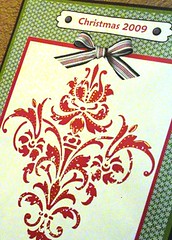
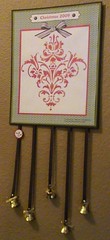
Well, there was a little more designing on my part but hey, I think for a quickie Advent assembly it came quite nice.  Here's a full view:


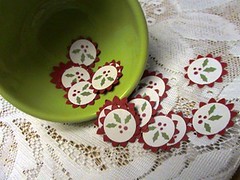
Here are the Hollies for counting down the days.  Just attach one to the ribbon for each day until Christmas.


Another close-up of the detail.  Doesn't the ribbon look real?  I've taken my gold Zig and embellished this color copy.


Now for the fun part.  Enjoy a complimentary PDF of this Advent (available in red and chocolate) for your home.  The files are accessible in the group "Flourish Advent" on my Pockets of Inspiration.NING site.  The site Flourish Advent is open to anyone (along with suggestions on assembly).  You can download both the Chocolate and the Red if you like.  There's a seperate PDF for the hollies.

Enjoy!

Melanie